

The Complete Conversion for macOS
Batch conversion for VFX and post-production. Turn EXR sequences into ProRes or H.264 review files, and transcode BRAW and ARRI camera originals into scene-linear EXRs for compositing. Everything runs locally on your Mac.

Beta-tested by VFX & post-production professionals
See the workflow in action
Built around the official Camera RAW SDKs professionals already trust.
Sequency integrates vendor workflows for ARRI and Blackmagic RAW, keeping camera-native color, metadata, and accurate decoding as core parts of your pipeline.
ARRI Image SDK
ARRIRAW, ARRICORE, HDE, LogC, and REVEAL-aware workflows built through the ARRI Partner Program.
SDK and trademark references identify format compatibility and implementation sources; no third-party endorsement is implied.
A More Direct Conversion Workflow
Sequency brings common media conversion steps into one focused macOS app, so VFX artists and editors can prepare review, proxy, and delivery files with fewer manual handoffs.
Set up conversions visually
Access practical media-conversion controls through a clear Mac interface, with sensible defaults and format-aware settings available when you need them.
Prepare files without building a timeline
When you only need a conversion, proxy, or review file, add your media to Sequency and choose the export settings directly.
Precisely the controls you need
The inspector keeps format-specific options close at hand, so settings stay relevant to the source, container, codec, and delivery target you are working with.
Keep color decisions explicit
Use OCIO and ACES-aware color handling for professional pipelines, with conversion choices that are visible and easier to review before export.
One Tool, Every Conversion
The three conversions that come up every day in post, in one focused application: assemble, transcode and extract.
Image Sequence to Video
Take EXR, PNG, TIFF or TGA sequences straight from your renderer and assemble them into a client-ready ProRes or H.264 file, with explicit input and output colour spaces.
Video to Video
Transcode camera-native BRAW and ARRI footage into lightweight proxy formats. Change codecs, adjust complex frame rates, or resize resolutions from the same focused workflow.
Video to Image Sequence
Extract frames from video for compositing, roto or grading. Write 8- or 16-bit PNG and TIFF, half-float OpenEXR, TGA or JPG sequences, numbered from the frame you choose, such as 1001.
Professional-Grade Features. Simple Interface
Sequency leverages Apple's native frameworks and OpenColorIO to deliver high performance and professional color accuracy in a clean, intuitive interface.
Hardware‑Accelerated Pipeline
Built on AVFoundation, VideoToolbox and Core Image, with Metal for GPU colour processing and a three-stage load, process and write pipeline.
Hybrid Color Engine
Automatic engine selection: ultra-fast ColorSync for sRGB/P3/Rec.709, and precision OCIO for ACES and camera logs.
Native EXR Handling
Reads EXR through Apple’s decoders and a bundled OpenEXR 3.2 library, so DWAA, DWAB and multipart files open even where macOS alone cannot.
Intelligent Detection
Automatically discovers image sequences with advanced pattern-based detection and metadata reading.
Flexible Output Options
Export ProRes 422, ProRes 4444, H.264, HEVC or VP9 in MKV, or PNG, TIFF, OpenEXR, TGA and JPG sequences, with bitrate, bit depth and compression controls.
Security & Sandboxing
Runs in the macOS App Sandbox and only touches the folders you grant. Media is processed on your Mac and never uploaded.
Advanced Workflow Tools
Fine-grained control over exports with features designed for professional pipelines.
Frame Range
Export partial sequences — scrub the timeline and select specific In and Out points instead of processing entire directories.
Pause & Resume
Total control over your renders. Pause heavy exports to free up system resources, and resume them without starting over.
Batch Queue
Line up multiple complex conversions, set independent settings for each, and let the batch queue run overnight.
Channel Extraction
Multichannel EXR splitting writes each render pass (beauty, diffuse, depth, normals, motion vectors) to its own folder. Data passes skip colour management so values stay untouched.
Audio Handling
Preserve, convert, or strip audio tracks completely. Advanced routing allows for Copy, fast AAC, or uncompressed PCM options.
VP9 Constraints
Dedicated VP9 encoding in MKV for web delivery. Choose Quality, Balanced, Fast or Realtime speed presets to trade encode time against size.
Hybrid Color Architecture
Sequency picks the engine for each conversion: Apple ColorSync for standard display spaces, OpenColorIO for ACES and camera log. Input and output colour spaces are always visible before you export.
Apple ColorSync
Apple’s native colour pipeline for standard delivery spaces. Fast, and the right tool when source and target are both display-referred.
- sRGB, Display P3, & Rec.709 bounds
- Native Core Image integration
- Minimal processing overhead
OpenColorIO
OpenColorIO 2.4, the colour engine used across VFX and animation, for scene-linear and log sources that need more than an ICC profile.
- ACES 2065-1 and ACEScg via the OCIO ACES 1.3 Studio config
- ARRI LogC3/LogC4, S-Log3, V-Log and other camera logs
- GPU shaders on Metal, with an OCIO CPU fallback
Built to be trusted with client media
A conversion tool earns its place in a pipeline by being exact about what it does. Here is what Sequency is built on, and how it behaves when something goes wrong.
Camera files decoded by the camera makers’ own code
BRAW and ARRI sources go through the official Blackmagic and ARRI SDKs, not a reverse-engineered decoder, so debayer, looks and colour science match the manufacturer.
It stops rather than guesses
If a required colour transform can’t run, Sequency stops the export and removes the partial file. It will not write pixels under the wrong colour label and call it done.
466 automated tests before 1.4 shipped
Regression tests run on real BRAW, ARRI, MXF, MKV and EXR files. Release candidates are also checked with independent tools such as ffprobe for frame count, timing, audio and colour tags.
Your media never leaves the Mac
No account, no upload, no render farm. Sequency runs in the macOS App Sandbox and only reads the folders you grant it.
Utility passes are left untouched
When splitting multichannel EXRs, depth, normals, position and motion vectors skip colour management, so no colour transform ever touches their values.
Every build maps to a commit
Since 1.1, each App Store and beta build is recorded against the exact source it came from, and every user-facing change is listed in the public release log.
| Blackmagic RAW SDK | 5.1 |
|---|---|
| ARRI Image SDK | 9.0.1 |
| OpenColorIO | 2.4.0 |
| OpenEXR | 3.2.1 |
| libvpx / libopus | 1.14.1 / 1.5.2 |
| dav1d | 1.5.4 |
| libwebp | 1.6.0 |
| Apple AVFoundation / VideoToolbox | macOS 14+ |
Supported Formats
What Sequency 1.4 reads and writes, including ARRI and Blackmagic RAW camera originals.
How It Works
Four simple steps to professional video conversion
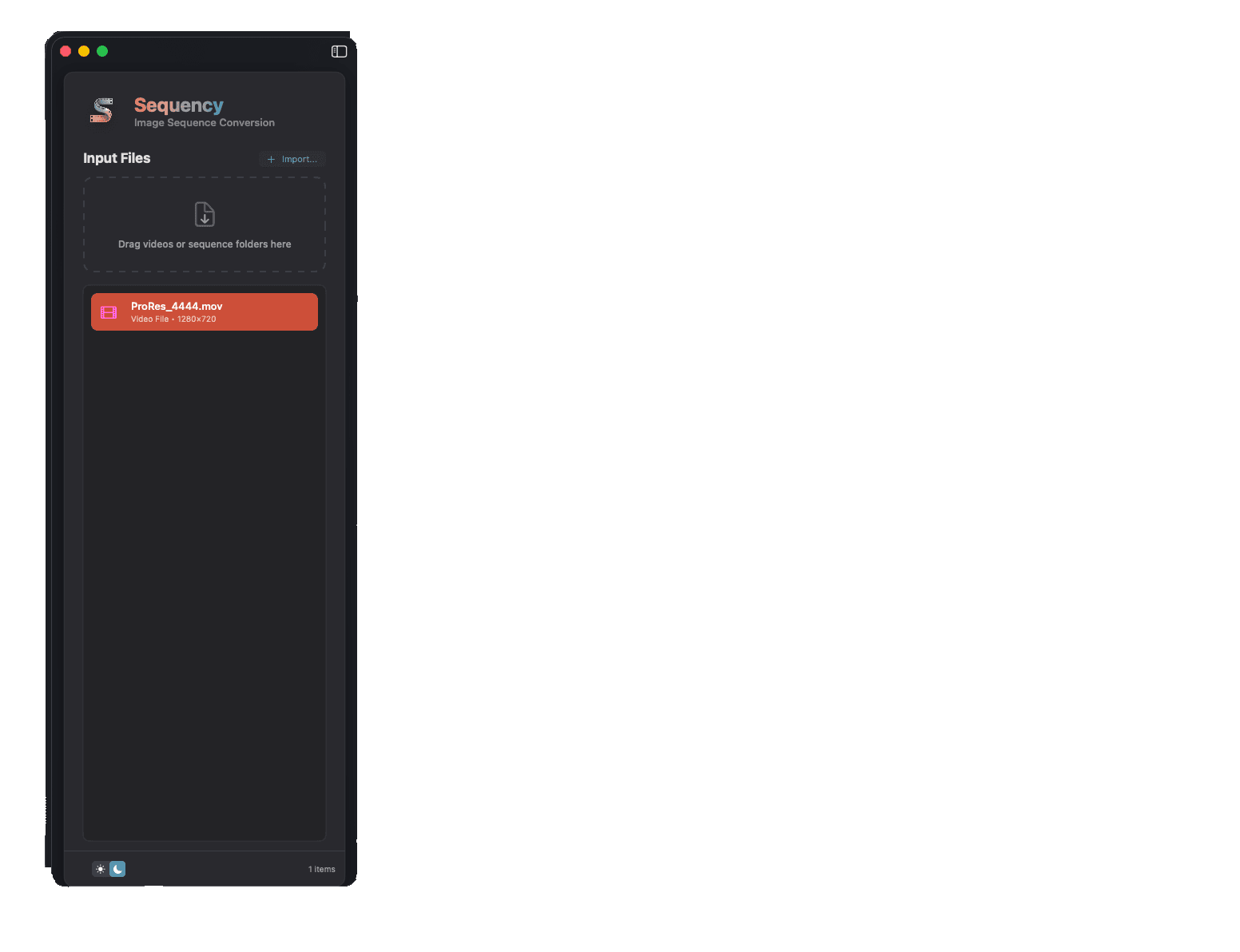
Select Input
Choose a folder (image sequence) or a single video file. Sequency lists detected sequences and relevant metadata.
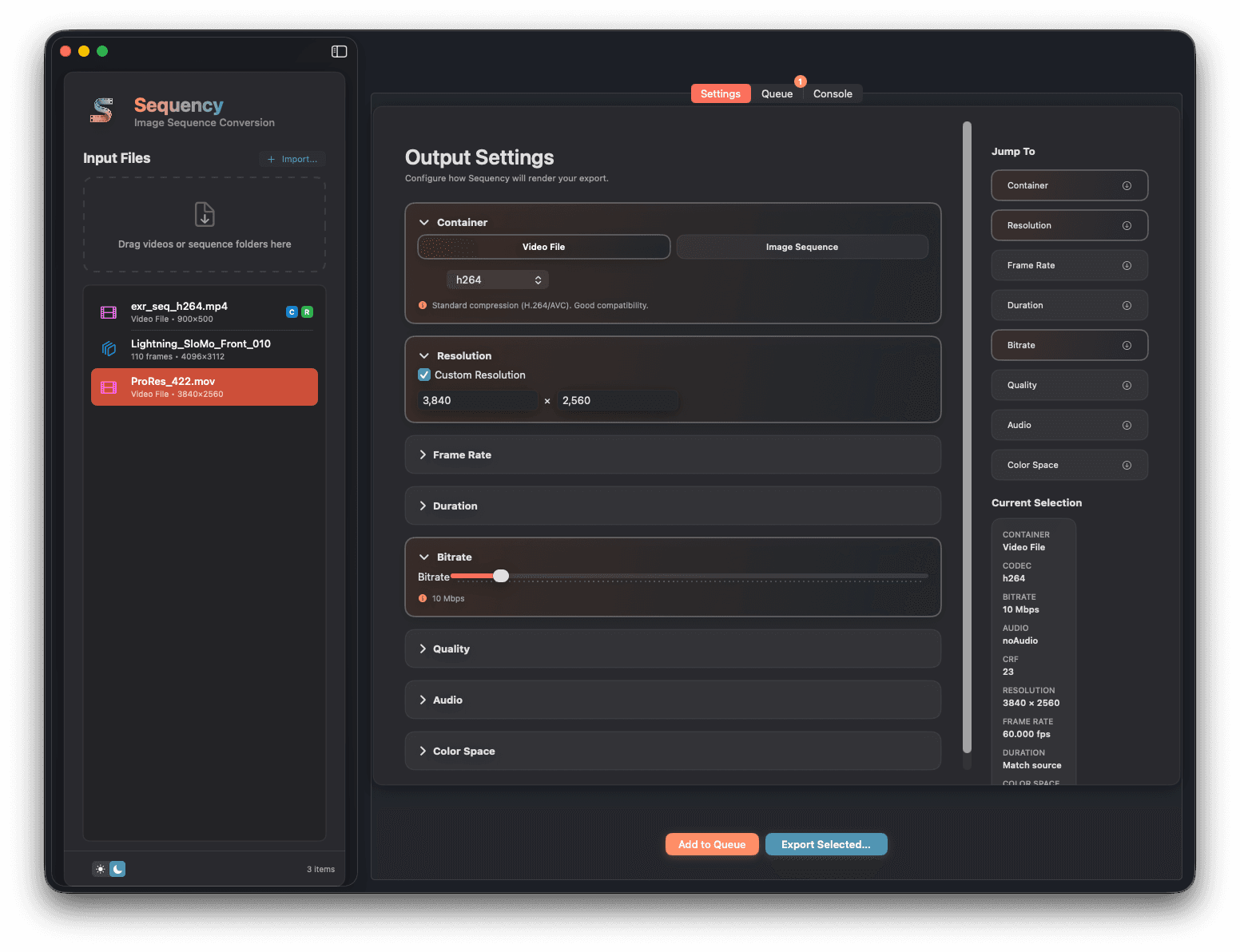
Configure Output
Pick codec/container or PNG sequence, set resolution, frame rate, duration, bitrate/CRF, audio, and color spaces.
Export or Queue
Export immediately or add to the queue. Uses intelligent, dual-path color‑managed exporters with compatibility checks.
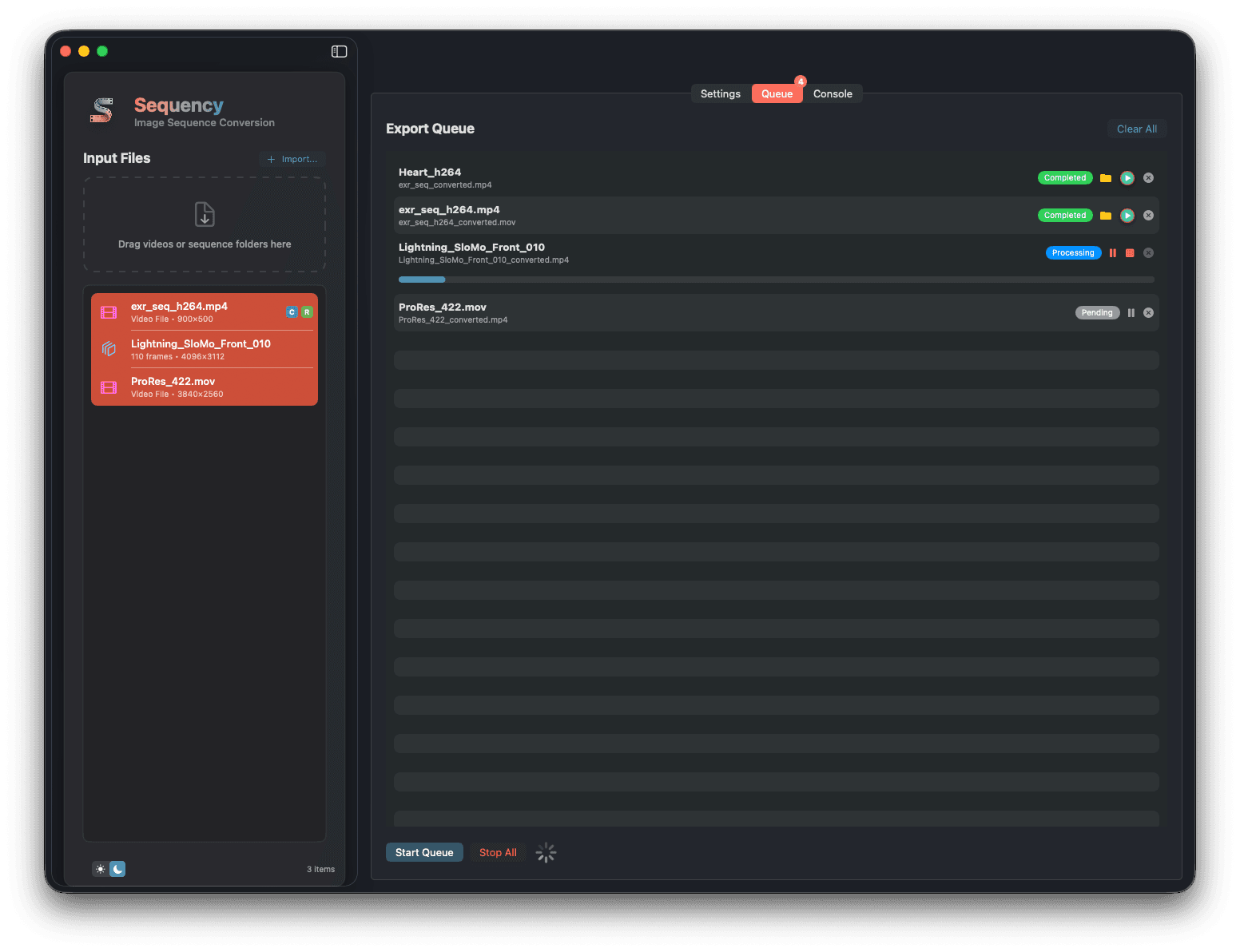
Monitor Progress
Track per‑job progress and logs with automatic remediation guidance for access or format issues.
Step-by-step guides
The exact settings for common post-production jobs, and how to check the file you deliver.
How to convert an EXR sequence to ProRes on a Mac
Turn an OpenEXR image sequence into a ProRes 422 or ProRes 4444 movie on macOS, with the right frame rate, alpha and ACES colour, in a few clicks.
ColourACEScg EXR to Rec.709 or sRGB: making review files that match your ACES viewer
Why ACES renders look clipped or flat when converted to Rec.709 or sRGB, and how to apply the ACES Output Transform in Sequency so review files match Nuke and Resolve.
Camera RAWConvert Blackmagic RAW (BRAW) to ProRes, H.264 or EXR on a Mac without Resolve
Decode Blackmagic RAW with the official Blackmagic RAW SDK and export ProRes, H.264 or scene-linear ACES EXR plates on macOS, without opening DaVinci Resolve.
Camera RAWConvert ARRIRAW, ARRICORE and ARRI MXF to ProRes or EXR on a Mac
Use the ARRI Image SDK inside Sequency to turn ALEXA ARRIRAW, ARRICORE and MXF clips into ProRes, H.264 or scene-linear EXR plates on macOS.
VideoExtract an image sequence (PNG, TIFF or EXR) from a video on a Mac
Export every frame of a MOV, MP4, MXF, MKV or camera RAW clip as numbered PNG, TIFF, OpenEXR, TGA or JPEG files on macOS, with frame numbering from 1001.
VideoHow to open and convert MXF files on a Mac (XDCAM, AVC-Intra, FFV1)
macOS can only play some MXF files. Sequency adds decoders for MPEG-2 IMX, DV50, AVC-Intra and FFV1 MXF and converts them to ProRes, H.264 or image sequences.
Get notified about new features and updates
No spam. Unsubscribe anytime.
A Straightforward Pricing Model
Sequency is available for a single, one-time purchase. This includes lifetime access and all future updates.
One-Time Purchase · No Subscription
- Professional video conversion tools
- Hybrid ColorSync & OCIO pipeline
- Hardware-accelerated processing
- Built-in help & troubleshooting
- Free updates for life
Need Help or Have an Idea?
Explore the Help Center for step-by-step guides, then drop into our Discord to share feedback, report bugs, or suggest new features. Your input guides Sequency's roadmap.
We read every message.